
# Members Register
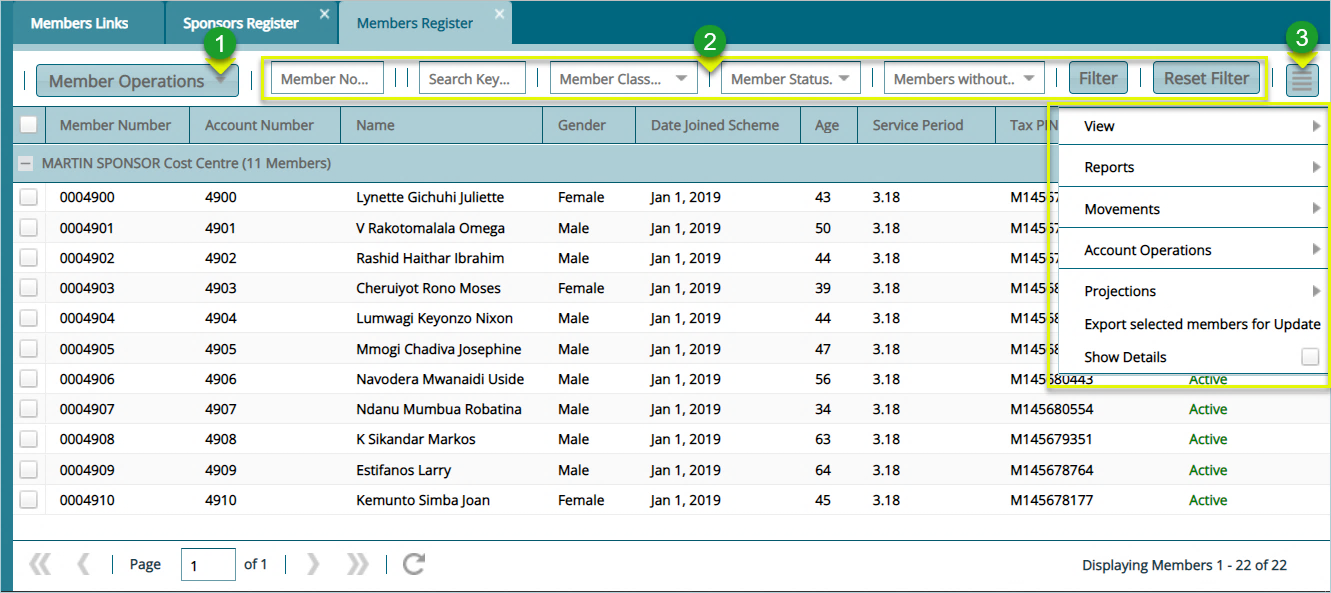
Clicking the View Member button will open the Members Register window where all members are listed under a selected sponsor as shown below:
Action
• Click label 1 button to carry out operations such as adding a new member from the drop-down list.
• Click label 2 text boxes to configure how to filter members from the list.
• Click label 3 button to access extra links such as a link to view members’ contribution balance history and various reports.
• Click label 4 checkboxes to display a section with extra details at the lower part of the window.
Tip
- More columns can be shown on the grid table by clicking the header cell of any column and adding new data fields.
# Accessing Member’s Extra Details
Clicking the Show Details checkbox will add a section on the lower part of the window showing member's extra details e.g., contribution, beneficiaries, closing balances, etc. as shown below:
